Stylish haircuts for women over 50 trending in 2026.
Donald Trump discusses maternal healthcare at public event.
Queen Camilla and Kate Middleton at royal event.

Homepage

Want To Clear Up iPhone Storage ASAP? Tech Experts Share Their Top Tips

February 21, 2026 by Abigail Connolly
shefinds | Homepage
Featured image

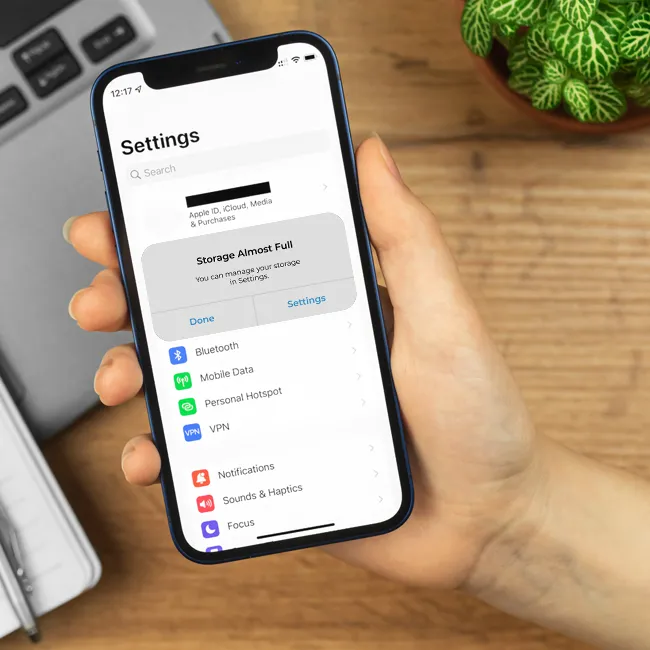
There are so many great things about having an iPhone, but one of the hardest parts is having to deal with full storage.

Most iPhone users have dealt with full storage notifications on their devices before, and there are a lot of people who have had to upgrade their iCloud plans to make more room and not have to delete some of their precious files or photos. However, there are ways to go about making some room on your phone without having to do anything too drastic or lose something important to you. Read more about what tech experts suggest below.

house unit img
Women Are Swapping Their Boring Water For This Ice Pop Electrolyte Mix!

Image from SHEfinds

1. Offload Unused Apps

This feature is one of those iPhone settings you should have on at all times if you're worried about your storage. Most iPhone users have been in a position where they have some apps on their device that they don't use as much, and those apps, if fully downloaded, can take up a lot of room. The Offload Unused Apps feature helps remove a lot of their excess data without fully deleting your progress or account on them to save some storage.


"Even if you're not using an app, it's storing large files, patches, and cached data, which is just growing and growing," explains tech pro Steven Athwal. "Offloading apps lets you remove the heavy data, but keep your settings. Essentially, cut the dead weight but keep all you need. It's perfect for people who keep apps 'just in case.'"

Image from SHEfinds

2. Delete Large Attachments

If you're someone who is active in their groupchats and likes to send a lot of pictures and videos back and forth with loved ones, that's great, but those actions can easily fill up your storage. Accessing the Delete Large Attachments feature in your iPhone storage settings can help you get rid of those excess files without actually deleting the important ones from your camera roll.


"Messages and email attachments build up, and you are not even aware," says tech expert Paul DeMott. "This built-in utility displays your biggest files to enable you to remove videos, PDF documents, and images that you no longer require, which can usually save you a number of gigabytes within a few minutes."

Image from SHEfinds

3. Empty Your 'Recently Deleted' Album

When you do feel the need to clear photos and videos to save room, like old screenshots you don't need anymore or unflattering pictures you don't want, it's good to delete them from your Camera Roll. However, there is also one more step you should take.


"Empty your 'recently deleted' photos and merge duplicates," adds Athwal. "Simply deleting photos doesn't remove them from your device; they actually stay for another 30 days so you can recover them. But this is taking up space and slowing down your phone. Empty the bin and free up real storage space. Also, merge duplicates to get rid of unnecessary copies."


Author:

Editorial Assistant

Abigail is a journalist based in Brooklyn, New York. As an Editorial Assistant for SheFinds, she covers topics ranging from celebrity news and fashion to wellness. She has written for other publications, including Chip Chick, Bandsintown, BroadwayWorld, and more. When she isn't writing, Abigail loves spending time in the city with her friends, being a 'dog mom' to her Chihuahua, and singing along to some of her favorite music.

Kylie Jenner with Stormi and Timothée Chalamet on romantic getaway.
Madonna showcasing her fashion at the Met Gala.
Taylor Swift boarding her private jet in 2024.
Woman with dark circles from lack of sleep.
Healthy banana nice cream dessert in a bowl.
Jennifer Lopez flaunts bold fashion at American Music Awards.
Vittoria Ceretti and Leonardo DiCaprio at fashion event.
Emma Stone at the Annual Actor Awards ceremony.
Salma Hayek at the 12th Annual Breakthrough Prize Ceremony.
Summer superfoods for glowing skin and collagen boost.
Kate Middleton during a state visit.
Middle-aged woman enjoying a glass of red wine.
Best Amazon Prime Day beauty deals for shoppers.
Ariana Grande at the Golden Globes red carpet.
Kylie Jenner in tailored black outfit at Met Gala 2025.
Woman applying sunscreen for sun protection and skincare.
Taylor Swift and Travis Kelce spotted together.
Healthy seeds versus pastries for nutritious snacking.
Ivanka Trump and Jared Kushner at public event.
Brad Pitt and Ines de Ramon at F1 movie premiere.
Kylie Jenner with Stormi and Timothée Chalamet on romantic getaway.
Madonna showcasing her fashion at the Met Gala.
Taylor Swift boarding her private jet in 2024.
Woman with dark circles from lack of sleep.
Healthy banana nice cream dessert in a bowl.
Jennifer Lopez flaunts bold fashion at American Music Awards.
Vittoria Ceretti and Leonardo DiCaprio at fashion event.
Emma Stone at the Annual Actor Awards ceremony.
Salma Hayek at the 12th Annual Breakthrough Prize Ceremony.
Summer superfoods for glowing skin and collagen boost.
Kate Middleton during a state visit.
Middle-aged woman enjoying a glass of red wine.
Best Amazon Prime Day beauty deals for shoppers.

Beauty

Prime Day is basically a holiday for anyone who's ...

Ariana Grande at the Golden Globes red carpet.
Kylie Jenner in tailored black outfit at Met Gala 2025.
Woman applying sunscreen for sun protection and skincare.
Taylor Swift and Travis Kelce spotted together.
Healthy seeds versus pastries for nutritious snacking.
Ivanka Trump and Jared Kushner at public event.
Brad Pitt and Ines de Ramon at F1 movie premiere.