Lauren Sánchez at Annual Living Legends of Aviation Awards
Christina Aguilera in semi-sheer dress at Obama Center opening
Kim Kardashian and North West enjoying a day out

Homepage

6 ‘Life-Changing’ iPhone Tips For Longer Battery Life, Less Lagging, And More Storage

March 20, 2024 by Lisa Cupido
shefinds | Homepage
Featured image

If you follow a few iPhone tips, you can take more control over your phone and how long it will last. Your iPhone is an investment; as such, any minor step you can take to prolong its battery, keep it from lagging, and improve its storage capabilities is well worth the effort, right? Fortunately, these six iPhone tips are simple to put into place. You can perform them all in the time it takes to finish your cup of coffee. Follow these steps to enjoy a better overall iPhone experience. 

Disable Background App Refresh 

You simply don’t need Background App Refresh enabled on your phone. Keeping it on provides the very small convenience of updating your apps at all times so that you don’t have to wait even a second when you load Facebook, TikTok, or other apps. But this convenience comes with a hefty price tag: battery power. Go to Settings > General > Background App Refresh and toggle it off. 

Turn Down Screen Brightness

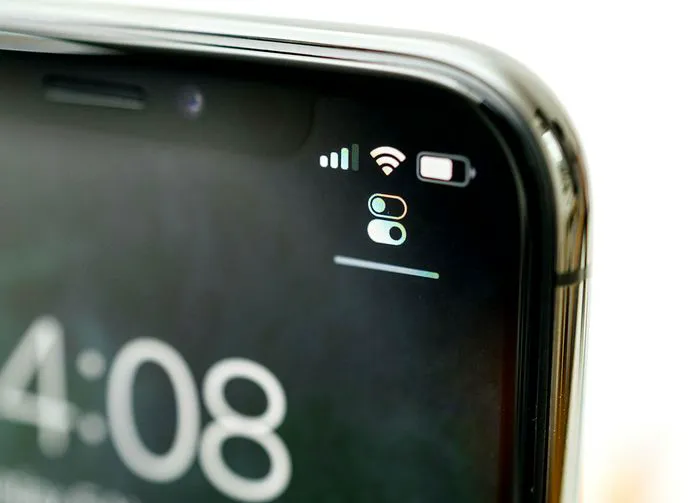
The simplest way to gain back battery power is by swiping up on your home screen, accessing your settings, and using the slider next to phone brightness to reduce your screen’s brightness as far down as is comfortable for your viewing. The lower you can go, the better for your battery power. 

house unit img
Women Are Swapping Their Boring Water For This Ice Pop Electrolyte Mix!
iphone-control-center

Move Photos and Video to iCloud


Keeping tons of photos and videos on your phone does nothing more than hog up your storage. Since you don’t likely need this content stored on your phone indefinitely, get into the habit of moving these over to iCloud or another Cloud storage system, and then deleting and permanently deleting them from your phone to gain back valuable storage space. 

slide-power-off-iphone

Delete Podcasts and TV Shows


Apps like Netflix and podcast apps allow you to easily download and stream so much media content. We love this convenience, but if you aren’t regularly deleting the media files that you’ve downloaded, they will remain on your device, taking up storage space. Get into the habit of pruning these from your phone. 


Turn Off Location Services


The fewer apps that use your location, the better for your phone’s battery. Some apps will benefit more from this data — your weather and GPS apps, for example, require it. But you can have more control over which apps don’t get to access your location by going to Settings > Privacy & Security > Location Services. Select the apps that you want to disable this for and change the settings on other apps as you see fit. 

Author:

Lisa Fogarty is a lifestyle writer and reporter based in New York who covers health, wellness, relationships, sex, beauty, and parenting.

Woman holding her head in pain from inflammation.
North West and Kim Kardashian share a moment.
Meghan Markle at the Invictus Games event
Jelly Roll at the Pre-Grammy Gala celebration
Smartphone charging for convenient use.
Prince Harry and Meghan at World Mental Health Day Gala
Donald Trump discusses maternal healthcare at event
Woman suffering from joint pain due to dietary issues.
Bianca Censori showcasing vibrant pink hair
Gwyneth Paltrow and Brad Falchuk at event
Coffee cup with inflammation-related health warning.
Natalie Portman at Golden Globes after-party
Tom Brady and Gisele Bündchen at public event
Various fast food logos including Dunkin', Chick-fil-A, and Starbucks.
JD Vance on college tour at University of Georgia
Jennifer Aniston and Benny Blanco at event
Trendy summer scents and fragrances for 2026 from beauty editors.
Julia Roberts attending Critics' Choice Awards
Popular iPhone apps for enhancing celebrity fan experiences.
Sofia Vergara dazzling at the Oscars red carpet.
Woman holding her head in pain from inflammation.
North West and Kim Kardashian share a moment.
Meghan Markle at the Invictus Games event
Jelly Roll at the Pre-Grammy Gala celebration
Smartphone charging for convenient use.
Prince Harry and Meghan at World Mental Health Day Gala
Donald Trump discusses maternal healthcare at event
Woman suffering from joint pain due to dietary issues.
Bianca Censori showcasing vibrant pink hair
Gwyneth Paltrow and Brad Falchuk at event
Coffee cup with inflammation-related health warning.
Natalie Portman at Golden Globes after-party
Tom Brady and Gisele Bündchen at public event
Various fast food logos including Dunkin', Chick-fil-A, and Starbucks.
JD Vance on college tour at University of Georgia
Jennifer Aniston and Benny Blanco at event
Trendy summer scents and fragrances for 2026 from beauty editors.

Beauty

Summer is my favorite season. If I could bottle up ...

Julia Roberts attending Critics' Choice Awards
Popular iPhone apps for enhancing celebrity fan experiences.
Sofia Vergara dazzling at the Oscars red carpet.