


Jennifer Aniston gives Benny Blanco a stylish hair makeover.
Top summer scents of 2026 recommended by beauty editors.
Julia Roberts shines at the Critics' Choice Awards.

Homepage

Experts Say This Is The One Common iCloud Mistake That Always Zaps Up Your Storage

June 4, 2022 by Lisa Cupido
shefinds | Homepage
Featured image

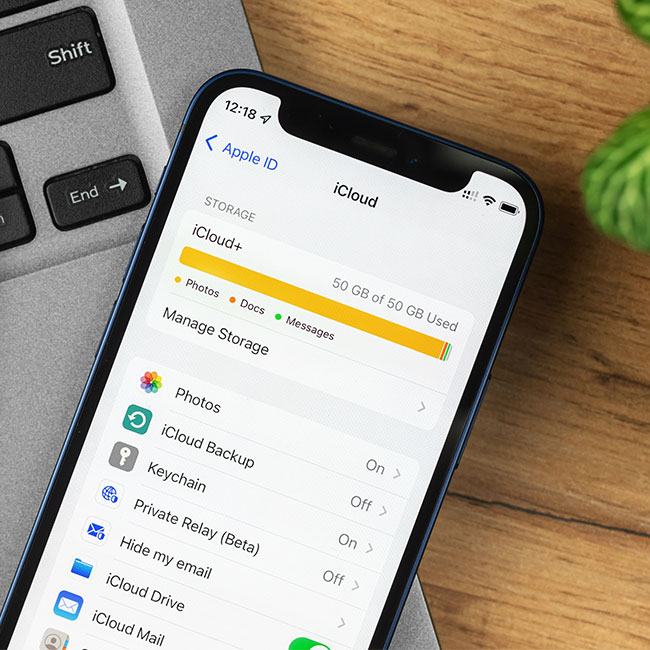
If you’re using iCloud to store your most important documents and data, you’re already one step ahead of the game when it comes to protecting tech files that are important to you. But in order to ensure that iCloud can properly do the job of storing as much as you need, it’s crucial to occasionally step back and make sure you are doing everything you can to maintain it. Like your iPhone itself, iCloud can run out of storage. But it isn’t necessary to spend more money and upgrade your storage capabilities. Your first step should be to reverse any of the bad habits you’re already committing when it comes to iCloud. Experts say this is the one common iCloud mistake that always zaps up your storage.

You Never Delete Anything From iCloud

Even though iCloud can hold a lot of data, everything has limitations. If you never engage in iCloud Spring cleaning and get rid of old files, you’re going to eventually run out of storage space. “Some of the most common mistakes include not deleting old photos, videos and documents, as well as keeping multiple copies of the same files,” says Michael Jan Baldicana, SEO and Technical Content Specialist with Dream Chasers. “These errors can quickly lead to an iCloud storage overload. This can result in a lot of storage space being wasted on old files that are no longer needed.”

The easiest way that Baldicana says you can avoid these mistakes is by being mindful of what you have stored on iCloud and how often you need to access it.

house unit img
Women Are Swapping Their Boring Water For This Ice Pop Electrolyte Mix!
icloud mistakes storage

You can also get rid of unnecessary files and folders by following these steps, according to Baldicana:


Go to Settings > General > Storage & iCloud Usage
On the Storage tab, click Manage Storage
Click on the Cached Data, Downloaded Files and Temporary Files tabs.


“It is important to know that you don't need to delete everything from your iCloud,” Baldicana says. “We need to be aware of these common mistakes so you don’t have to worry about your storage running out.”

Author:

Lisa Fogarty is a lifestyle writer and reporter based in New York who covers health, wellness, relationships, sex, beauty, and parenting.

Sofia Vergara posing at the Oscars event.
Kate Middleton with Prince George at a public event.
Woman sweetening aromatic coffee with sugar.
Gwyneth Paltrow at the Golden Globes red carpet event.
Donald Trump and Melania Trump at a public appearance.
Angelina Jolie attending the AFI Fest 2023 event.
Taylor Swift and Travis Kelce enjoying a night out together.
Makeup tips video by Nikol Johnson for flawless beauty.
Ivanka Trump at the Fontainebleau Las Vegas Grand Opening.
Crofton cold brew maker with drinking glasses from Aldi.
Barron Trump during Donald Trump's inauguration ceremony.
Ariana Grande at the Oscars, showcasing her glamorous look.
Wooden board featuring bagels, blueberries, and butter.
Close-up of male hands holding an Apple iPhone 17 Pro Max.
Common skincare mistakes women over 40 should avoid.
Haircuts that subtly lift the face and draw attention away from jowls.
Meghan Markle at Day 4 of the Invictus Games event.
Gigi Hadid arriving at the Le Grand Diner du Louvre.
Jennifer Aniston using an iPhone for her Instagram post
Close-up of iPhone displaying various apps and features
Sofia Vergara posing at the Oscars event.
Kate Middleton with Prince George at a public event.
Woman sweetening aromatic coffee with sugar.
Gwyneth Paltrow at the Golden Globes red carpet event.
Donald Trump and Melania Trump at a public appearance.
Angelina Jolie attending the AFI Fest 2023 event.
Taylor Swift and Travis Kelce enjoying a night out together.
Makeup tips video by Nikol Johnson for flawless beauty.
Ivanka Trump at the Fontainebleau Las Vegas Grand Opening.
Crofton cold brew maker with drinking glasses from Aldi.
Barron Trump during Donald Trump's inauguration ceremony.
Ariana Grande at the Oscars, showcasing her glamorous look.
Wooden board featuring bagels, blueberries, and butter.
Close-up of male hands holding an Apple iPhone 17 Pro Max.
Common skincare mistakes women over 40 should avoid.
Haircuts that subtly lift the face and draw attention away from jowls.
Meghan Markle at Day 4 of the Invictus Games event.
Gigi Hadid arriving at the Le Grand Diner du Louvre.
Jennifer Aniston using an iPhone for her Instagram post
Close-up of iPhone displaying various apps and features