Kim Kardashian at Kering's Caring for Women Dinner.
Madonna in blue mini dress and metallic boots at Paris event.
Taylor Swift boarding private jet in 2024.

Homepage

The One Mistake Experts Say Every Android User Should Stop Making ASAP Because It Ruins Your Battery

January 30, 2025 by Lisa Cupido
shefinds | Homepage
Featured image

There are plenty of mistakes you can make on your Android (remember: don’t click on any links that you receive in text messages from unknown senders). But when it comes to mistakes you make that can have a detrimental effect on your Android’s battery, the warnings aren’t always as serious. That’s because the effects of having your phone hacked and of spyware and malware being installed on your device are catastrophic in the short term, while battery drainage can be a slow-burning trickle that you don’t feel right away, until the day your phone feels it all at once.

The best thing you can do now for your Android is to adopt good habits that help prolong your phone’s battery life. There’s one major mistake so many people make that can ruin your battery, but it’s an easy one to fix.

house unit img
Women Are Swapping Their Boring Water For This Ice Pop Electrolyte Mix!
blue-samsung

An Overly Bright Screen


Similar to how a lightbulb that runs all day every day without a break will wear out quicker, keeping your Android screen lit up like a firework will run its battery down faster. A screen that’s at maximum brightness forces your phone to work harder to keep it lit so brightly. It also adds extra heat to your phone, which in turn affects your battery as well.


There are a few steps you can take to minimize the effects of a bright screen. If you use wallpapers, set them to darker themes and use Dark Mode to lower brightness while still keeping your screen legible. Go to Settings > Display > Dark Theme to enable it.
brightness-setting-android

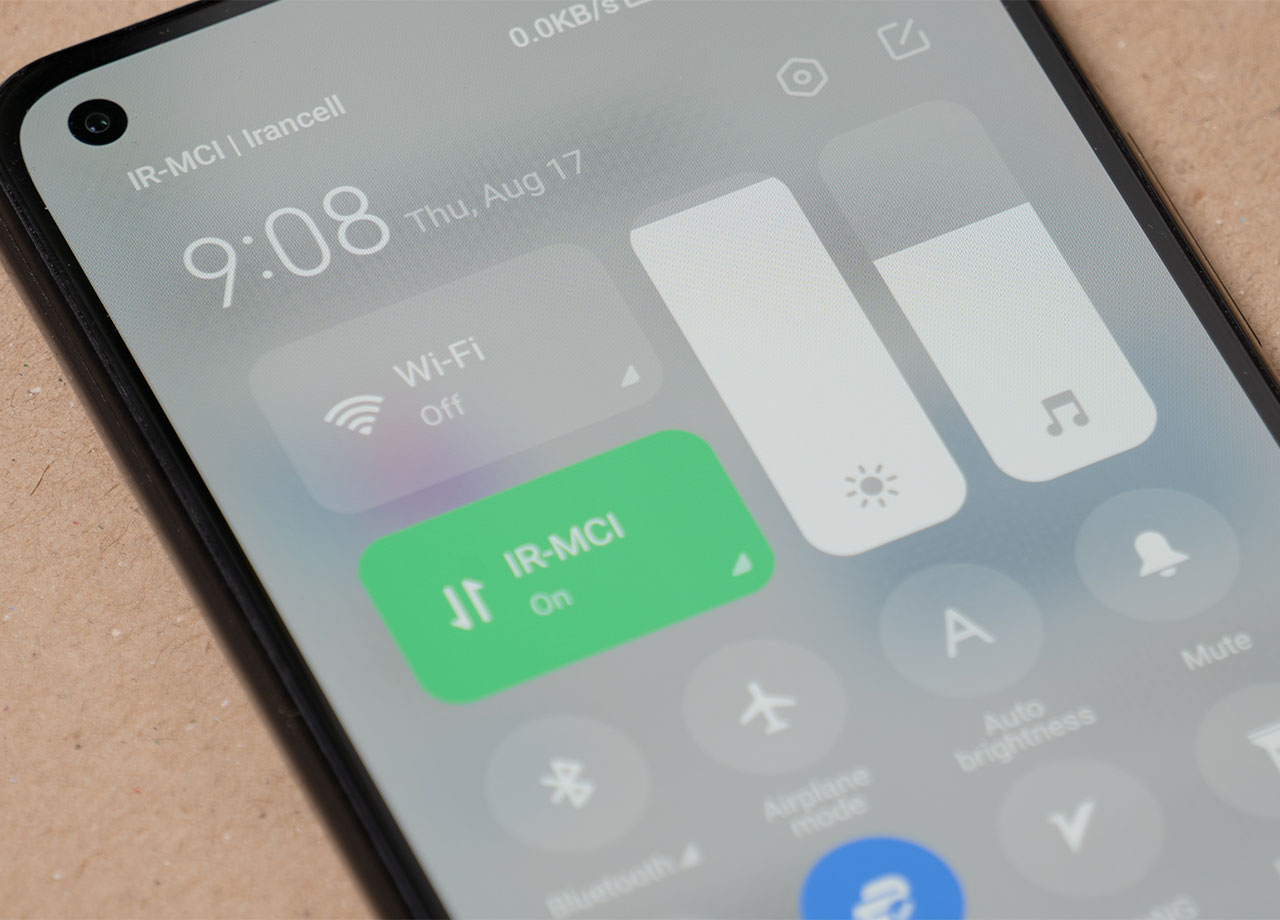
You can manually adjust brightness on your Android by swiping down from the top of the screen to open the Quick Settings menu and using the manual slider to lower your brightness. Android’s Adaptive Brightness feature detects the light in your environment and adjusts the brightness based on both your surroundings and your phone habits. To enable this, go to Settings > Display > Adaptive Brightness.


Finally, enable Battery Saver Mode to lower screen brightness and conserve battery power. Head over to Settings > Battery > Battery Saver (or Power Saving Mode on some devices) and enable it.


Author:

Lisa Fogarty is a lifestyle writer and reporter based in New York who covers health, wellness, relationships, sex, beauty, and parenting.

Delicious banana nice cream dessert in a bowl.
Jennifer Lopez stunning in Defaience at American Music Awards.
Vittoria Ceretti and Leonardo DiCaprio together at an event.
Emma Stone attending the Annual Actor Awards.
Salma Hayek at the 12th Annual Breakthrough Prize Ceremony.
Colorful superfoods for glowing skin this summer.
Kate Middleton on a state visit in formal attire.
Middle-aged woman enjoying a glass of wine.
Best Prime Day beauty deals on Amazon.
Ariana Grande at the Golden Globes red carpet.
Kylie Jenner showcasing style at the Met Gala 2025.
Woman applying sunscreen for sun protection.
Taylor Swift and Travis Kelce at a public appearance.
Kim Kardashian's controversial Capri leggings and oversized shirt outfit.
Ivanka Trump and Jared Kushner at a social event.
Brad Pitt and Ines de Ramon at the F1 premiere.
Bad Bunny performing or attending the Grammys.
Madonna's blue mini dress and metallic boots criticized by fans.
iPhone charging, displaying settings on the screen.
Trendy Italian bob hairstyle perfect for summer looks.
Delicious banana nice cream dessert in a bowl.
Jennifer Lopez stunning in Defaience at American Music Awards.
Vittoria Ceretti and Leonardo DiCaprio together at an event.
Emma Stone attending the Annual Actor Awards.
Salma Hayek at the 12th Annual Breakthrough Prize Ceremony.
Colorful superfoods for glowing skin this summer.
Kate Middleton on a state visit in formal attire.
Middle-aged woman enjoying a glass of wine.
Best Prime Day beauty deals on Amazon.

Beauty

Prime Day is basically a holiday for anyone who's ...

Ariana Grande at the Golden Globes red carpet.
Kylie Jenner showcasing style at the Met Gala 2025.
Woman applying sunscreen for sun protection.
Taylor Swift and Travis Kelce at a public appearance.
Kim Kardashian's controversial Capri leggings and oversized shirt outfit.
Ivanka Trump and Jared Kushner at a social event.
Brad Pitt and Ines de Ramon at the F1 premiere.
Bad Bunny performing or attending the Grammys.
Madonna's blue mini dress and metallic boots criticized by fans.
iPhone charging, displaying settings on the screen.
Trendy Italian bob hairstyle perfect for summer looks.