Emma Stone at the Annual Actor Awards event.
Salma Hayek in a lavender gown at the Breakthrough Prize Ceremony.
Collagen-boosting superfoods for glowing summer skin.

Homepage

Running Low On iPhone Storage But Don't Want To Delete Photos? Here Are 2 Ways To Make Room In Your Device Without Removing Pictures

February 13, 2026 by Abigail Connolly
shefinds | Homepage
Featured image

Have you ever felt the pressure of getting a ‘low storage’ notification on your iPhone and suddenly begin deleting a bunch of pictures and videos?

When those notifications start to pop up, it can be really easy to feel like one of the main things you need to do is clear out your photo album. However, that runs the risk of having to delete precious memories and things you might not want to let go of. Instead of immediately resorting to that option, there are other things you can do to clear up some room. Read more about two of them below.

house unit img
Women Are Swapping Their Boring Water For This Ice Pop Electrolyte Mix!

Image from SHEfinds

1. Delete Your Largest Apps

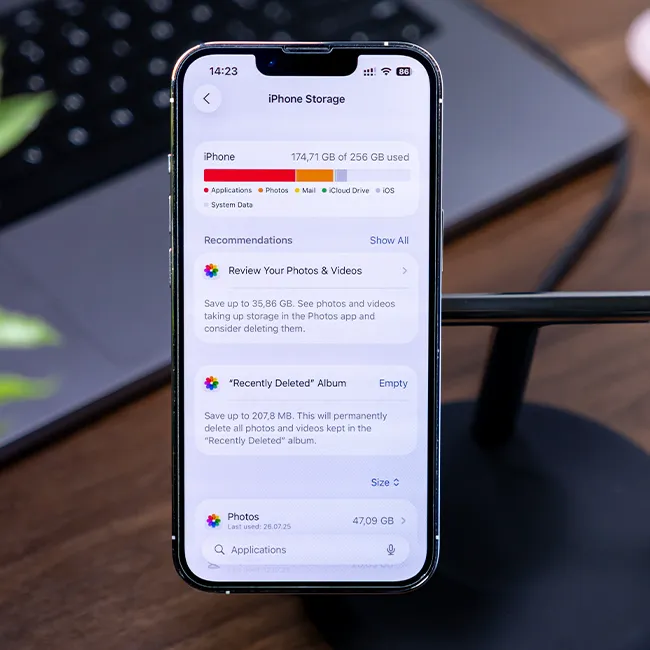
So often, people associate full storage on iPhones with photos and videos. After all, some of these files can take up some room, especially if the videos are long and the photos are of higher quality. However, people tend to forget just how much of an impact apps can have on their phone's storage. Therefore, deleting and/or offloading the apps that take up the most storage on your device can help tremendously.


"Go to Settings > General > iPhone Storage and check which apps are taking up the most storage," tech expert Nelson Aguilar for CNET. "Certain built-in apps, such as Photos and Messages, can't be offloaded, so be warned. If you find a sizable app you want to offload, tap on it and hit Offload App. Wait a little bit, and the app should then be removed offline, while your documents and data will stay saved on your device."

Image from SHEfinds

2. Review Large Attachments

If you're a person who likes to exchange lots of photos, videos, and files with your friends and loved ones via your Messages app, then there's a good chance you frequently have to find ways to clear your storage or get 'storage full' notifications. However, you can actually clear all of those files and attachments you get via text without removing them from your camera roll.


Go to Settings > General > iPhone Storage and scroll down until you see Review Large Attachments. From there, you can go through all of the photos and videos exchanged in your Messages app. It's suggested that, in order to free up the most storage, you delete all of them, as if they're photos you've saved to your Camera Roll or sent from your gallery; they will not be erased from there.


Author:

Editorial Assistant

Abigail is a journalist based in Brooklyn, New York. As an Editorial Assistant for SheFinds, she covers topics ranging from celebrity news and fashion to wellness. She has written for other publications, including Chip Chick, Bandsintown, BroadwayWorld, and more. When she isn't writing, Abigail loves spending time in the city with her friends, being a 'dog mom' to her Chihuahua, and singing along to some of her favorite music.

Best beauty deals on Amazon for Prime Day shoppers.
Ariana Grande at the Golden Globes, stunning red carpet look.
Kylie Jenner's Met Gala 2025 outfit featuring sophisticated black tailoring.
Woman applying sunscreen for sun protection and skincare.
Taylor Swift and Travis Kelce together at an event.
Healthy seeds, not pastries, promoting nutritious snacking choices.
Ivanka Trump and Jared Kushner at a public appearance.
Bad Bunny at the Grammy Awards red carpet.
iPhone charging plugged into a laptop for convenience.
iPhone settings screen showing charging options and battery status.
Trendy Italian bob hairstyle that’s popular this summer.
Angelina Jolie receiving the Trophee Chopard award.
Selena Gomez at the Rare Impact Fund Benefit gala.
Pool lounger with cocktail and trail mix for relaxation.
Brad Pitt and Ines de Ramon at the F1 premiere.
Queen Camilla with Prince Harry and Meghan Markle.
Travis Kelce and Taylor Swift at an event.
Barack Obama with Michelle, Malia, and Sasha Obama.
Amazon Prime Day week logo on smartphone and laptop screens.
Woman applying concealer for a flawless makeup finish.
Best beauty deals on Amazon for Prime Day shoppers.

Beauty

Prime Day is basically a holiday for anyone who's ...

Ariana Grande at the Golden Globes, stunning red carpet look.
Kylie Jenner's Met Gala 2025 outfit featuring sophisticated black tailoring.
Woman applying sunscreen for sun protection and skincare.
Taylor Swift and Travis Kelce together at an event.
Healthy seeds, not pastries, promoting nutritious snacking choices.
Ivanka Trump and Jared Kushner at a public appearance.
Bad Bunny at the Grammy Awards red carpet.
iPhone charging plugged into a laptop for convenience.
iPhone settings screen showing charging options and battery status.
Trendy Italian bob hairstyle that’s popular this summer.
Angelina Jolie receiving the Trophee Chopard award.
Selena Gomez at the Rare Impact Fund Benefit gala.
Pool lounger with cocktail and trail mix for relaxation.
Brad Pitt and Ines de Ramon at the F1 premiere.
Queen Camilla with Prince Harry and Meghan Markle.
Travis Kelce and Taylor Swift at an event.
Barack Obama with Michelle, Malia, and Sasha Obama.
Amazon Prime Day week logo on smartphone and laptop screens.

Fashion

This summer, I might be shopping for more clothes and ...

Woman applying concealer for a flawless makeup finish.