
Popular fast food logos: Dunkin', Chick-fil-A, Starbucks
Jennifer Aniston gives Benny Blanco a stylish hair makeover
Top summer fragrances of 2026 recommended by beauty editors

Homepage

An Apple Expert Tells Us How To Make Your iPhone Battery Last As Long As Possible

July 18, 2025 by Lisa Cupido
shefinds | Homepage
Featured image

If you’ve ever glanced at your iPhone battery percentage and felt like it’s draining faster than it should, you’re not alone. iPhone batteries can be surprisingly fickle — one day lasting all afternoon, and the next barely making it to lunch. While some battery wear is inevitable over time, a lot of what shortens battery life comes down to daily habits. The way you charge your phone, the apps you run, and even certain settings can all have a bigger impact than you might think.

With a few mindful tweaks, you can help preserve your battery’s health and extend the time between charges. From avoiding common charging mistakes to optimizing your phone’s settings, small changes can lead to noticeably better performance. And Apple experts have been telling us all along that it’s possible to make simple changes for a longer-lasting battery:

If you want your iPhone to keep up with your day (instead of dying halfway through it), try changing these three settings.

house unit img
Women Are Swapping Their Boring Water For This Ice Pop Electrolyte Mix!
iphone-display-brightness

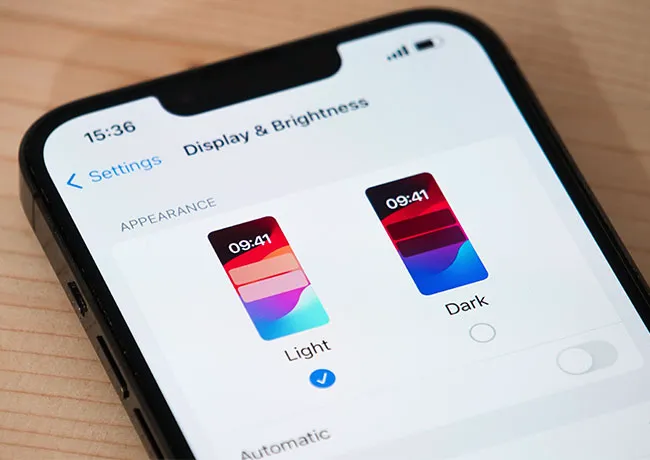
1. Lower Screen Brightness


Your iPhone’s display is one of the biggest battery drainers, especially if its brightness is set too high. A screen that’s constantly at full brightness uses far more power than necessary — even in well-lit environments. To help your battery last longer, manually lower your screen brightness by swiping down to access the Control Center and adjusting the brightness slider. You can also enable Auto-Brightness in Settings > Accessibility > Display & Text Size so your phone adjusts brightness based on your surroundings.
iphone-background-app-refresh

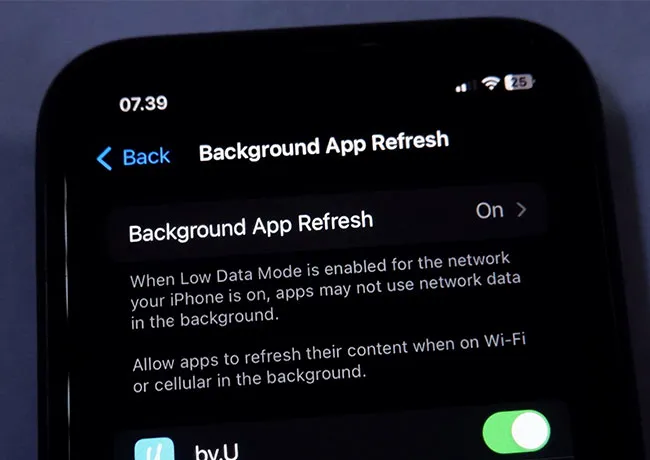
2. Disable Background App Refresh


Background App Refresh allows apps to update content even when you’re not using them — this sounds helpful, but it can slowly drain your battery throughout the day. Apps like social media, email, and news often refresh unnecessarily, using both data and power. To conserve energy, go to Settings > General > Background App Refresh and either turn it off completely or limit it to only essential apps. Choosing “Wi-Fi only” instead of “Wi-Fi & Cellular” is another way to reduce energy.
iphone-disable-location-services

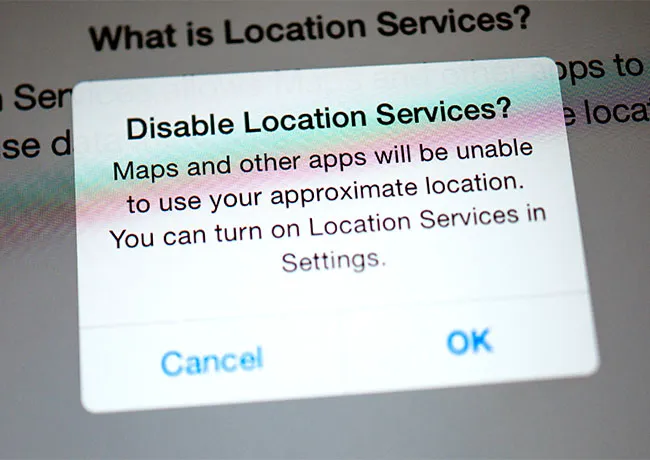
3. Limit Location Services


While GPS features are convenient for maps, weather, and social media check-ins, having location on for all apps is a major battery killer. Some apps track your location even when you’re not using them — unnecessarily draining power. To take control, go to Settings > Privacy & Security > Location Services and review which apps are allowed access. Switch any non-essential apps from “Always” or “While Using” to “Never,” or use “Ask Next Time” for more control.

Author:

Lisa Fogarty is a lifestyle writer and reporter based in New York who covers health, wellness, relationships, sex, beauty, and parenting.

Top iPhone apps for healthy meal planning and tracking
Sofia Vergara stunning look at the Oscars red carpet.
Kate Middleton and Prince George share a sweet moment.
Woman sweetening aromatic coffee with sugar.
Gwyneth Paltrow glamorous appearance at the Golden Globes.
Donald Trump and Melania Trump at a public event.
Angelina Jolie attending AFI Fest in elegant attire.
Taylor Swift and Travis Kelce spotted together.
Makeup tips shared by Nikol Johnson on YouTube.
Ivanka Trump at the Fontainebleau Las Vegas grand opening.
Crofton cold brew maker with stylish drinking glasses.
Barron Trump at Donald Trump's inauguration event.
Ariana Grande showcasing her style at the Oscars.
Delicious bagels and blueberries on a wooden board.
Close-up of hands holding the Apple iPhone 17 Pro Max.
Common skincare mistakes women over 40 should avoid.
Hairstyles that subtly lift the face and distract from jowls.
Meghan Markle enjoying day 4 of the Invictus Games.
Gigi Hadid at the Le Grand Diner du Louvre photocall.
Using an iPhone for daily tasks and communication.
Top iPhone apps for healthy meal planning and tracking
Sofia Vergara stunning look at the Oscars red carpet.
Kate Middleton and Prince George share a sweet moment.
Woman sweetening aromatic coffee with sugar.
Gwyneth Paltrow glamorous appearance at the Golden Globes.
Donald Trump and Melania Trump at a public event.
Angelina Jolie attending AFI Fest in elegant attire.
Taylor Swift and Travis Kelce spotted together.
Makeup tips shared by Nikol Johnson on YouTube.
Ivanka Trump at the Fontainebleau Las Vegas grand opening.
Crofton cold brew maker with stylish drinking glasses.
Barron Trump at Donald Trump's inauguration event.
Ariana Grande showcasing her style at the Oscars.
Delicious bagels and blueberries on a wooden board.
Close-up of hands holding the Apple iPhone 17 Pro Max.
Common skincare mistakes women over 40 should avoid.
Hairstyles that subtly lift the face and distract from jowls.
Meghan Markle enjoying day 4 of the Invictus Games.
Gigi Hadid at the Le Grand Diner du Louvre photocall.
Using an iPhone for daily tasks and communication.