Jennifer Lopez shines in balloon-sleeved blouse at American Music Awards.
Emma Stone at the Annual Actor Awards event.
Salma Hayek in a lavender gown at the Breakthrough Prize Ceremony.

Homepage

A Tech Expert Reveals The 3 Privacy Settings You Should Change On Your iPhone To Stop Apps From Collecting Your Data

January 15, 2025 by Lisa Cupido
shefinds | Homepage
Featured image

If you allow your apps to gain access to your data, they will take ALL of your data, and ask for more. In your app’s defense, your data is like fuel: it provides something valuable to sell to its third-party advertisers, while learning more about its own users’ habits and desires so that it can be better equipped to fulfill those and keep you on its app.

But just because we understand its needs doesn’t mean we have an obligation to fulfill them. Your data is yours, to some degree, and the more steps you take to secure it, the more private it will remain. There are several privacy settings that you can enable to help keep your apps out of your data.

Focusing on these three apps can help make a big difference when it comes to your privacy and security.

house unit img
Women Are Swapping Their Boring Water For This Ice Pop Electrolyte Mix!
iphone-cross-site-tracking

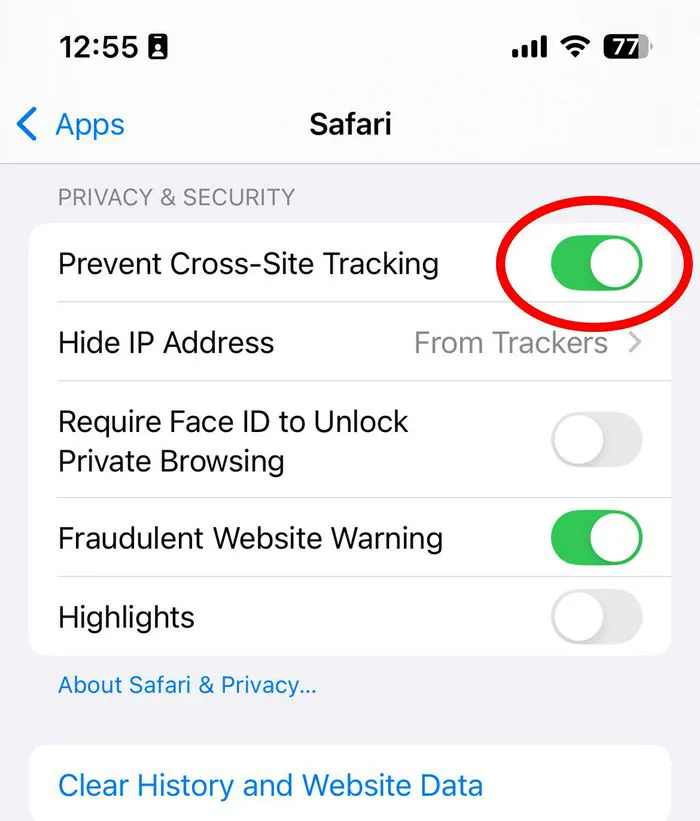
1. Cross-Site Tracking


Cross-site tracking allows apps and advertisers to track your movements and behaviors across other websites — so even when you aren’t on that specific app, it can still track you. The advertiser or app will embed trackers (cookies and scripts) on that site and then follow you and take little snapshots of your actions, particularly if they involve shopping for products and making purchases. Even the act of showing interest in a product is enough to get these trackers excited, and it’s why you will then return to an app like Facebook and see several ads for that exact product or similar ones.


To get this under control, go to Settings > Privacy > Tracking and toggle off "Allow Apps to Request to Track.”
iphone-location-services

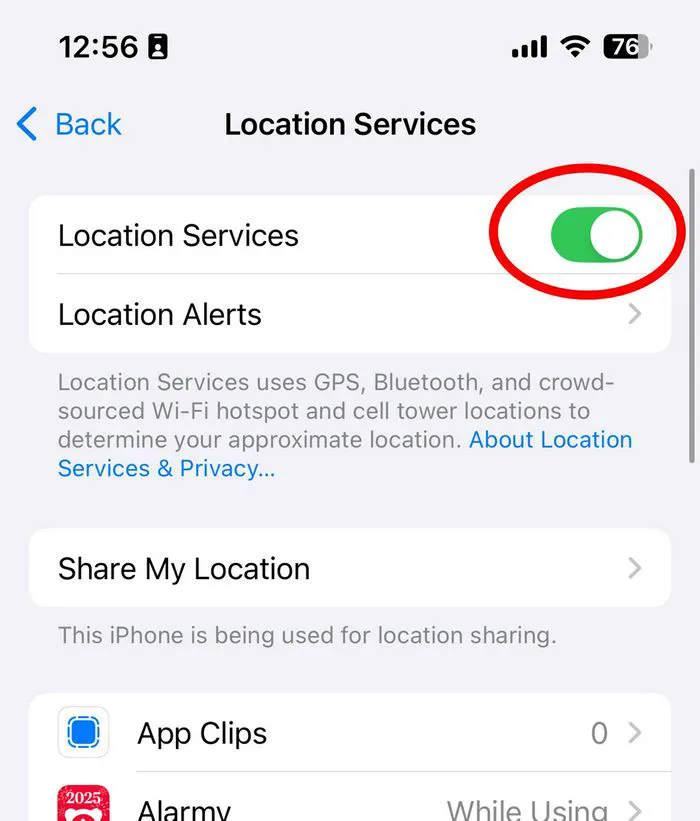
2. Location Services


When Location Services is turned on for your apps, they will be able to see your physical location as you travel throughout your day. This information is crucial to them as they can better learn your habits and needs and target ads to you based on those needs. Knowing your location also makes it easy for the app to provide geographical information about photos that you post.


Some apps require your location to work properly — think of navigation apps, weather apps, and apps that deliver food to your door. But the vast majority of them do not need to know your whereabouts, and you never have to allow an app to access your location when you aren’t actively using it. Go to Settings > Privacy > Location Services. Turn off Location Services completely or change your permissions for each individual app.
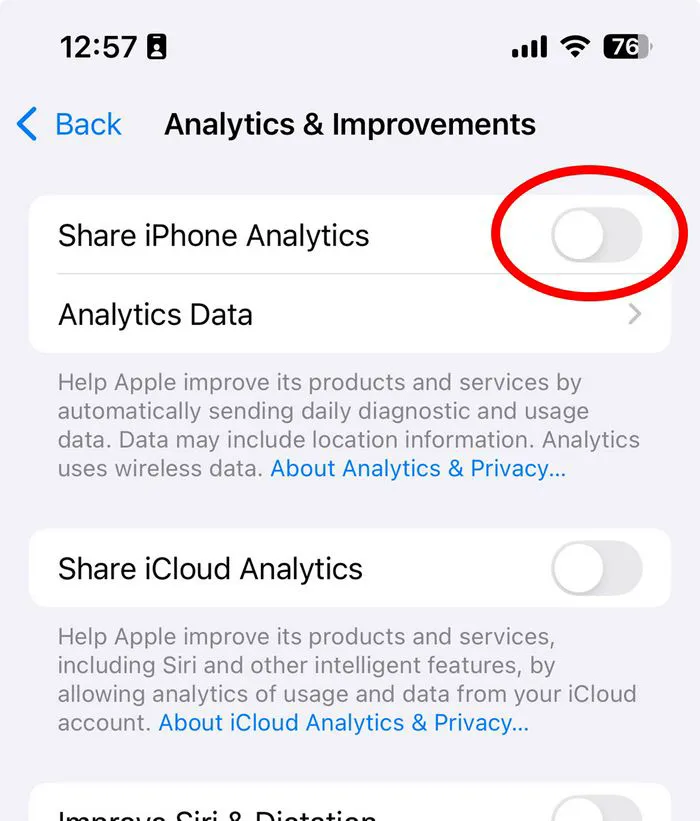
iphone-analytics

3. iPhone Analytics


Apps rely on iPhone Analytics to gather data about its users, including how they interact with their apps. On the surface, this can be a positive thing: an app developer can rely on this data to fix bugs, improve user experience, and create better features. But you aren’t beholden to app developers to help them improve their product.


To disable App Analytics, go to Settings > Privacy > Analytics & Improvements > turn off the toggle for Share With App Developers.


Author:

Lisa Fogarty is a lifestyle writer and reporter based in New York who covers health, wellness, relationships, sex, beauty, and parenting.

Middle-aged woman enjoying a glass of wine at home.
Best beauty deals on Amazon for Prime Day shoppers.
Ariana Grande at the Golden Globes, stunning red carpet look.
Kylie Jenner's Met Gala 2025 outfit featuring sophisticated black tailoring.
Woman applying sunscreen for sun protection and skincare.
Taylor Swift and Travis Kelce together at an event.
Healthy seeds, not pastries, promoting nutritious snacking choices.
Ivanka Trump and Jared Kushner at a public appearance.
Bad Bunny at the Grammy Awards red carpet.
iPhone charging plugged into a laptop for convenience.
iPhone settings screen showing charging options and battery status.
Trendy Italian bob hairstyle that’s popular this summer.
Angelina Jolie receiving the Trophee Chopard award.
Selena Gomez at the Rare Impact Fund Benefit gala.
Pool lounger with cocktail and trail mix for relaxation.
Brad Pitt and Ines de Ramon at the F1 premiere.
Queen Camilla with Prince Harry and Meghan Markle.
Travis Kelce and Taylor Swift at an event.
Barack Obama with Michelle, Malia, and Sasha Obama.
Amazon Prime Day week logo on smartphone and laptop screens.
Middle-aged woman enjoying a glass of wine at home.
Best beauty deals on Amazon for Prime Day shoppers.

Beauty

Prime Day is basically a holiday for anyone who's ...

Ariana Grande at the Golden Globes, stunning red carpet look.
Kylie Jenner's Met Gala 2025 outfit featuring sophisticated black tailoring.
Woman applying sunscreen for sun protection and skincare.
Taylor Swift and Travis Kelce together at an event.
Healthy seeds, not pastries, promoting nutritious snacking choices.
Ivanka Trump and Jared Kushner at a public appearance.
Bad Bunny at the Grammy Awards red carpet.
iPhone charging plugged into a laptop for convenience.
iPhone settings screen showing charging options and battery status.
Trendy Italian bob hairstyle that’s popular this summer.
Angelina Jolie receiving the Trophee Chopard award.
Selena Gomez at the Rare Impact Fund Benefit gala.
Pool lounger with cocktail and trail mix for relaxation.
Brad Pitt and Ines de Ramon at the F1 premiere.
Queen Camilla with Prince Harry and Meghan Markle.
Travis Kelce and Taylor Swift at an event.
Barack Obama with Michelle, Malia, and Sasha Obama.
Amazon Prime Day week logo on smartphone and laptop screens.

Fashion

This summer, I might be shopping for more clothes and ...