Jennifer Lopez shines in balloon-sleeved blouse at American Music Awards.
Emma Stone at the Annual Actor Awards event.
Salma Hayek in a lavender gown at the Breakthrough Prize Ceremony.

Homepage

Turning Off These 2 iPhone Settings Can Protect You From Scammers

June 15, 2025 by Lisa Cupido
shefinds | Homepage
Featured image

Your iPhone is packed with smart features designed to make life more convenient—but some of those same settings can unintentionally leave you more vulnerable to scammers. From location sharing to message previews on your lock screen, a few default options could be giving away more information than you realize. Cybercriminals are always on the lookout for small openings they can exploit, and the more accessible your personal data is, the easier it becomes for them to craft convincing scams or gain unauthorized access to your accounts.

The good news is that a few simple tweaks can go a long way in protecting your privacy. By adjusting just two key settings, you can significantly improve your phone’s security and reduce your chances of falling victim to common scams. Here are two settings to consider changing.

house unit img
Women Are Swapping Their Boring Water For This Ice Pop Electrolyte Mix!
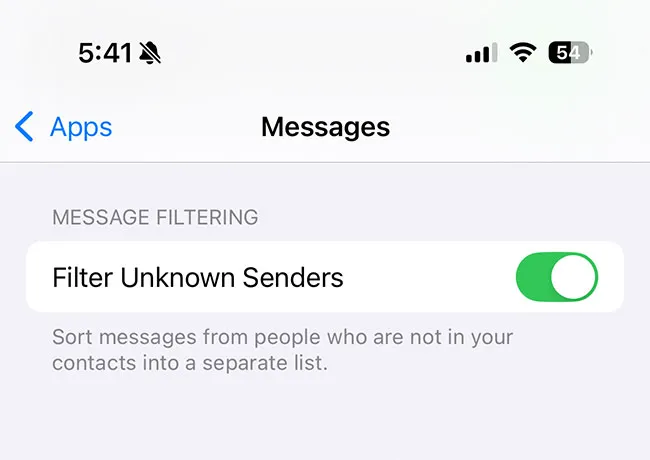
iphone-filter-unknown-senders

1. Filter Unknown Senders


Turning on the “Filter Unknown Senders” setting on your iPhone is a simple but effective way to protect yourself from text message scams. When this feature is enabled, messages from numbers not in your contacts are automatically sorted into a separate tab in the Messages app. This helps reduce the chances of accidentally clicking on suspicious links or engaging with phishing texts that often pretend to be from banks, delivery services, government agencies, or even Apple.


By keeping unknown messages out of your main inbox, you’re creating a safer digital space and giving yourself more control over what you see and minimizes potential scam threats. To turn it on, go to Settings > Messages and toggle on Filter Unknown Senders.
iphone-location-services

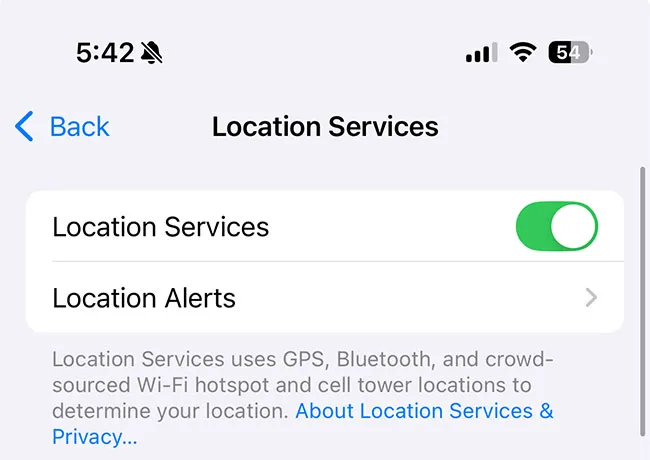
2. Location Services


Location Services can be incredibly helpful for things like navigation and weather updates. bBut if this setting is left wide open, it can also share more of your whereabouts than you might realize. Some apps and websites may use your location in ways that go beyond what’s necessary, and in some cases, scammers can take advantage of that information to customize phishing attempts that they suspect you’re more likely to click on or create convincing fake messages based on the places you’ve been.


To stay safer, it’s a good idea to review which apps have access to your location and limit it only to those that truly need it. You can do this by going to Settings > Privacy & Security > Location Services and selecting “While Using the App” or “Never” for apps that don’t need constant access. By tightening these settings, you reduce unnecessary tracking and give scammers less personal context to exploit.


Author:

Lisa Fogarty is a lifestyle writer and reporter based in New York who covers health, wellness, relationships, sex, beauty, and parenting.

Middle-aged woman enjoying a glass of wine at home.
Best beauty deals on Amazon for Prime Day shoppers.
Ariana Grande at the Golden Globes, stunning red carpet look.
Kylie Jenner's Met Gala 2025 outfit featuring sophisticated black tailoring.
Woman applying sunscreen for sun protection and skincare.
Taylor Swift and Travis Kelce together at an event.
Healthy seeds, not pastries, promoting nutritious snacking choices.
Ivanka Trump and Jared Kushner at a public appearance.
Bad Bunny at the Grammy Awards red carpet.
iPhone charging plugged into a laptop for convenience.
iPhone settings screen showing charging options and battery status.
Trendy Italian bob hairstyle that’s popular this summer.
Angelina Jolie receiving the Trophee Chopard award.
Selena Gomez at the Rare Impact Fund Benefit gala.
Pool lounger with cocktail and trail mix for relaxation.
Brad Pitt and Ines de Ramon at the F1 premiere.
Queen Camilla with Prince Harry and Meghan Markle.
Travis Kelce and Taylor Swift at an event.
Barack Obama with Michelle, Malia, and Sasha Obama.
Amazon Prime Day week logo on smartphone and laptop screens.
Middle-aged woman enjoying a glass of wine at home.
Best beauty deals on Amazon for Prime Day shoppers.

Beauty

Prime Day is basically a holiday for anyone who's ...

Ariana Grande at the Golden Globes, stunning red carpet look.
Kylie Jenner's Met Gala 2025 outfit featuring sophisticated black tailoring.
Woman applying sunscreen for sun protection and skincare.
Taylor Swift and Travis Kelce together at an event.
Healthy seeds, not pastries, promoting nutritious snacking choices.
Ivanka Trump and Jared Kushner at a public appearance.
Bad Bunny at the Grammy Awards red carpet.
iPhone charging plugged into a laptop for convenience.
iPhone settings screen showing charging options and battery status.
Trendy Italian bob hairstyle that’s popular this summer.
Angelina Jolie receiving the Trophee Chopard award.
Selena Gomez at the Rare Impact Fund Benefit gala.
Pool lounger with cocktail and trail mix for relaxation.
Brad Pitt and Ines de Ramon at the F1 premiere.
Queen Camilla with Prince Harry and Meghan Markle.
Travis Kelce and Taylor Swift at an event.
Barack Obama with Michelle, Malia, and Sasha Obama.
Amazon Prime Day week logo on smartphone and laptop screens.

Fashion

This summer, I might be shopping for more clothes and ...