Image from SHEfinds
Jennifer Lopez at 2025 American Music Awards in stylish outfit.
Emma Stone at Annual Actor Awards looking unrecognizable amid rumors.

Homepage

Turning Off These 2 iPhone Settings Can Help Your Phone Run Faster

May 29, 2025 by Lisa Cupido
shefinds | Homepage
Featured image

How can you get your iPhone to run at a faster pace? The answer isn’t so simple — and may require a deep dive into the lifespan of your battery and your storage issues. Generally speaking, if your phone is using up massive amounts of storage, your phone will suffer because of it, and could be much slower. But there are also certain settings on your phone that can cause it to lag. These settings may offer you services that are convenient and hard to give up, but when the choice is between a faster phone and one that sends countless notifications to keep you abreast of updates on apps, you may find yourself choosing speed.

To speed up your phone, try disabling these two settings.

house unit img
Women Are Swapping Their Boring Water For This Ice Pop Electrolyte Mix!
iphone-background-app-refresh

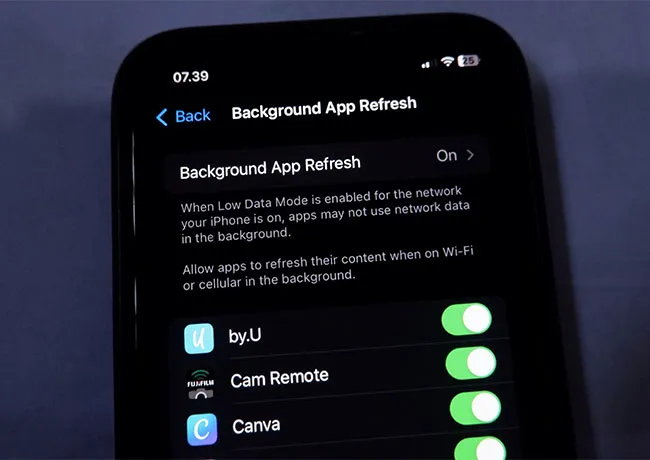
1. Background App Refresh


By consistently allowing apps to update content in the background and perform tasks such as fetching news and new messages, Background App Refresh drains your battery, consumes RAM and CPU, and can cause major phone lag. The best thing you can do for your phone speed is to learn to live without the setting. Go to Settings > General > Background App Refresh > Off. If you really need it turned on for a specific app, then only keep it enabled for that app.
iphone-push-notifications

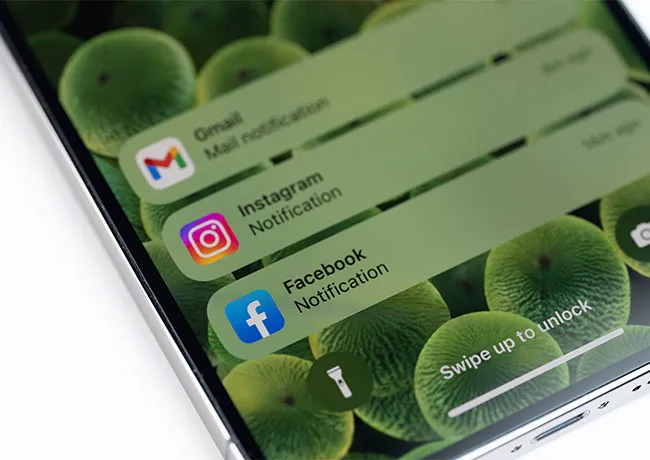
2. Push Notifications


If you love being on top of new notifications as soon as they arrive, Push Notifications is the setting of your dreams. But by working hard at all times to push through updates to you, the setting uses up network resources and can interrupt your phone’s performance. Go to Settings > Notifications, and review apps individually to decide which, if any, require push notifications. Or turn it off completely to benefits from a more efficient device.


Author:

Lisa Fogarty is a lifestyle writer and reporter based in New York who covers health, wellness, relationships, sex, beauty, and parenting.

Image from SHEfinds
Image from SHEfinds
Image from SHEfinds
Image from SHEfinds
Kylie Jenner at the 2025 Met Gala showcasing elegant black tailoring.
Image from SHEfinds
Taylor Swift and Travis Kelce together at a public event.
Image from SHEfinds
Ivanka Trump and Jared Kushner attending a formal gathering.
Bad Bunny performing at the Grammy Awards ceremony.
Image from SHEfinds
Image from SHEfinds
Image from SHEfinds
Angelina Jolie receiving the Trophee Chopard Award at a gala.
Selena Gomez at the 3rd Annual Rare Impact Fund Benefit event.
Image from SHEfinds
Brad Pitt with Ines de Ramon at the F1 World Premiere.
Queen Camilla with Prince Harry and Meghan Markle at a royal event.
Travis Kelce and Taylor Swift spotted together at an event.
Barack and Michelle Obama with daughters Malia and Sasha.
Image from SHEfinds
Image from SHEfinds
Image from SHEfinds

Beauty

Prime Day is basically a holiday for anyone who's ...

Image from SHEfinds
Kylie Jenner at the 2025 Met Gala showcasing elegant black tailoring.
Image from SHEfinds
Taylor Swift and Travis Kelce together at a public event.
Image from SHEfinds
Ivanka Trump and Jared Kushner attending a formal gathering.
Bad Bunny performing at the Grammy Awards ceremony.
Image from SHEfinds
Image from SHEfinds
Image from SHEfinds
Angelina Jolie receiving the Trophee Chopard Award at a gala.
Selena Gomez at the 3rd Annual Rare Impact Fund Benefit event.
Image from SHEfinds
Brad Pitt with Ines de Ramon at the F1 World Premiere.
Queen Camilla with Prince Harry and Meghan Markle at a royal event.
Travis Kelce and Taylor Swift spotted together at an event.
Barack and Michelle Obama with daughters Malia and Sasha.