



Tired woman showing effects of lack of sleep.
Delicious banana nice cream dessert for healthy eating.
Jennifer Lopez stunning in Defaience at AMAs 2025.

Homepage

Experts Agree: 2 Ways To Free Up More Storage On Your Device Without Deleting Any Photos

September 25, 2024 by Lisa Cupido
shefinds | Homepage
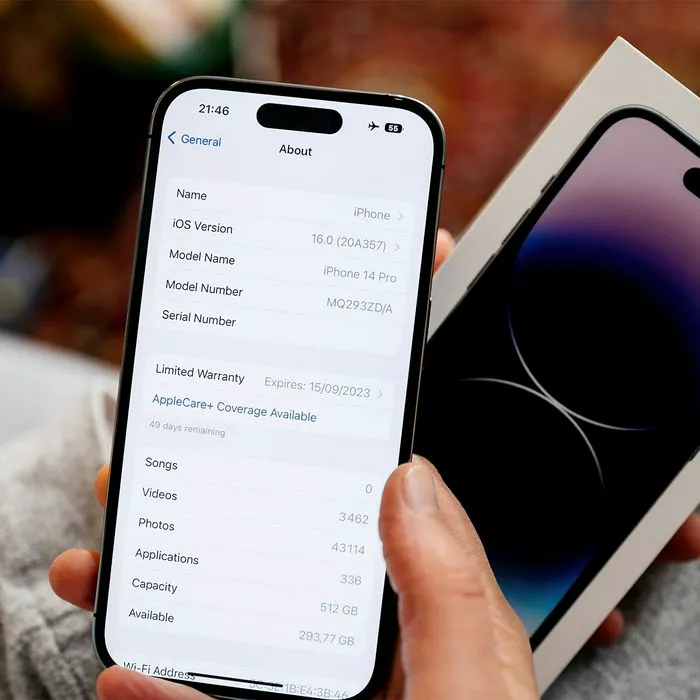
Featured image

When most people hear about iPhone storage issues and how to solve them, they may think: delete, delete, delete. They aren’t wrong. Deleting apps, large files like attachments sent to you in messages, music files, and photos and videos will absolutely go a long way toward freeing up storage. You can try lesser methods, such as deleting pre-installed apps, and this will give you back some space. But the reality is: deleting larger files and data will always have more impact on space than anything else you can do.

Once you receive that dreaded storage full pop-up on your phone, the clock has already almost run out on your options. You may feel desperate to do anything you can to get storage back so that you can continue using your phone the way you like to use it. A better option is to plan ahead and perform light maintenance on your phone every now and then so that you never see that pop-up in the first place.

Here are two ways that iPhone experts say you can free up more storage without deleting photos.

house unit img
Women Are Swapping Their Boring Water For This Ice Pop Electrolyte Mix!
iphone-storage-settings

1. Clear Your Browser’s Cache


The browser on your phone, whether you’re using Safari or another browser, collects “junk files’ as you continually scroll and visit various websites. These files form what we call the browser’s cache, and deleting this cache is one of the fastest and easiest ways you can free up more storage space. One thing to keep in mind though is that your log-in and web data will also be deleted when you clear cache, unless it is saved in the iCloud Keychain.


Fortunately, clearing your browser’s cache is simple: open iPhone Settings > scroll down to Safari > tap on Clear History and Website Data.

woman-texting-iphone

2. App Management


You can also clear the cache of specific apps, which helps free up storage space. There are three ways to manage your apps. Apps like Amazon allow you to clear cache right within the app. But a second effective method is deleting an app and reinstalling it. This is more of a “hassle,” according to one expert from CleverFiles, but it’s a “foolproof way to clear cache and data from any app and start with a clean slate.”


Check individual apps to decide which of these two methods make the most sense. Considering leaving some of these apps off your phone entirely is another really great, fast way to free up space.


Author:

Lisa Fogarty is a lifestyle writer and reporter based in New York who covers health, wellness, relationships, sex, beauty, and parenting.

Salma Hayek at the 12th Annual Breakthrough Prize Ceremony
Collagen-boosting superfoods for glowing summer skin
Middle-aged woman enjoying a glass of wine at home.
Best Prime Day beauty deals on Amazon
Ariana Grande attending the Golden Globes
Kylie Jenner's stylish black outfit at Met Gala 2025.
Woman applying sunscreen for sun protection
Taylor Swift and Travis Kelce together in candid moment.
Healthy seeds instead of pastries for nutritious snacking.
Ivanka Trump and Jared Kushner at social event.
Bad Bunny performing at the Grammy Awards.
iPhone charging plugged into a laptop for power.
iPhone settings displayed while charging.
Exploring the Italian bob hair trend for summer 2023
Angelina Jolie receiving The Trophee Chopard Award.
Selena Gomez at Rare Impact Fund Benefit event.
Pool lounger with cocktail and trail mix from Aldi.
Brad Pitt and Ines de Ramon at F1 World Premiere.
Queen Camilla with Prince Harry and Meghan Markle.
Travis Kelce and Taylor Swift sharing a moment together.
Salma Hayek at the 12th Annual Breakthrough Prize Ceremony
Collagen-boosting superfoods for glowing summer skin
Middle-aged woman enjoying a glass of wine at home.
Best Prime Day beauty deals on Amazon

Beauty

Prime Day is basically a holiday for anyone who's ...

Ariana Grande attending the Golden Globes
Kylie Jenner's stylish black outfit at Met Gala 2025.
Woman applying sunscreen for sun protection
Taylor Swift and Travis Kelce together in candid moment.
Healthy seeds instead of pastries for nutritious snacking.
Ivanka Trump and Jared Kushner at social event.
Bad Bunny performing at the Grammy Awards.
iPhone charging plugged into a laptop for power.
iPhone settings displayed while charging.
Exploring the Italian bob hair trend for summer 2023
Angelina Jolie receiving The Trophee Chopard Award.
Selena Gomez at Rare Impact Fund Benefit event.
Pool lounger with cocktail and trail mix from Aldi.
Brad Pitt and Ines de Ramon at F1 World Premiere.
Queen Camilla with Prince Harry and Meghan Markle.
Travis Kelce and Taylor Swift sharing a moment together.

















