



Taylor Swift beside her private jet in 2024.
Woman looking tired after a sleepless night.
Delicious banana nice cream dessert.

Homepage

Apple Experts Say You Should Make This One Change To Your iPhone Settings To Save So Much Battery

March 24, 2022 by Lisa Cupido
shefinds | Homepage
Featured image

If your iPhone is struggling to maintain a charge, it may be time to do something about it — and that doesn’t mean automatically running off to an Apple store to make new purchases. Instead, changing a few of your phone’s settings may be just the thing to get it back up to speed. Tech Expert Daniel Foley, SEO Specialist at UNAGI, says you should make this one change to your iPhone settings to save so much battery.

Turn on Low Power Mode

“When your iPhone’s battery level drops below 20%, it will offer to switch to Low Power Mode,” Foley says. “But if you’re attempting to save as much power as possible, consider turning it on even earlier. Low Power Mode dims your screen, makes it switch off faster, and refreshes background programs less frequently. While in Low Power Mode, for example, you might not be able to receive emails. If you’re using 5G internet, it’ll most likely drop you back to 4G. When your iPhone is in Low Power Mode, you can tell by looking at the battery bar. Low Power Mode is active if it’s yellow.”

While you are adjusting settings for the sake of battery power, Foley says there are two more to consider changing.

house unit img
Women Are Swapping Their Boring Water For This Ice Pop Electrolyte Mix!
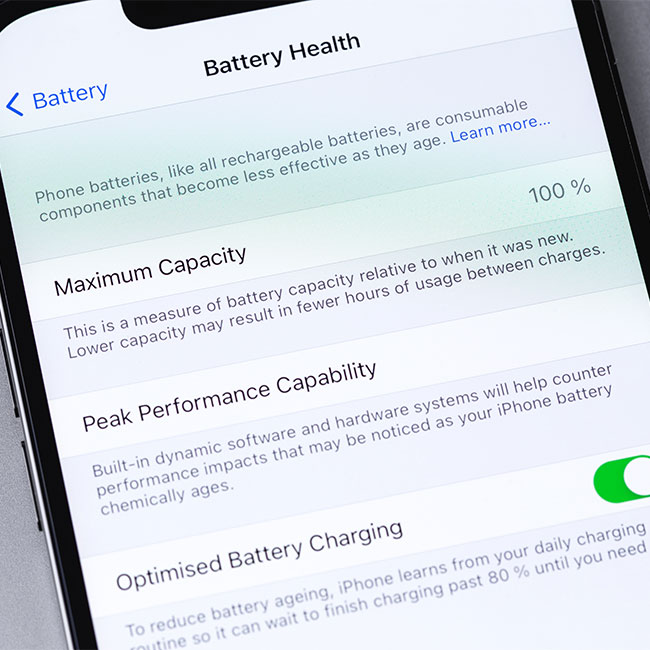
iphone settings battery

Turn down your brightness


One of the most significant battery drainers is screen brightness, according to Foley. “Dimming the lights is a simple technique to save energy,” he says. “To launch your Control Center, swipe down from the top-right corner of the screen and drag your finger down the brightness meter to reduce it. You can also enable Auto-Brightness, which automatically adjusts the brightness based on the amount of light available. This option can be found by going to Settings, then pressing Accessibility, then Display & Text Size.”


Connect to Wi-Fi or go into Airplane Mode


While Wi-Fi was once thought to be the fastest way to drain your battery, we now know it consumes less energy than a mobile internet connection. “Connect to a Wi-Fi signal to preserve the battery while browsing the internet,” Foley says. “Also, try to stay connected to the same Wi-Fi network for as long as possible; if your iPhone is continuously looking for a new connection, it will drain your battery. Consider turning on Airplane Mode if you're not accessing the internet at all. This will completely isolate your iPhone from all wireless communications, thereby turning off most apps while reducing battery usage.”


Make these simple changes to your iPhone settings and notice a big difference in your battery power. 

Author:

Lisa Fogarty is a lifestyle writer and reporter based in New York who covers health, wellness, relationships, sex, beauty, and parenting.

Emma Stone at the Annual Actor Awards ceremony.
Salma Hayek at the 12th Annual Breakthrough Prize Ceremony.
Collagen-boosting superfoods for glowing summer skin.
Middle-aged woman enjoying a glass of wine.
Best Prime Day beauty deals on Amazon right now.
Ariana Grande attending the Golden Globes ceremony.
Kylie Jenner showcasing black style at the 2025 Met Gala.
Woman applying sunscreen for sun protection.
Taylor Swift and Travis Kelce together at an event.
Seeds as a healthier alternative to pastries.
Ivanka Trump and Jared Kushner posing for a photo.
Bad Bunny performing at the Grammy Awards.
iPhone charging plugged into a laptop for power.
iPhone charging settings displayed on the screen.
The viral Italian bob hairstyle trending this summer.
Angelina Jolie receiving the Trophee Chopard Award.
Selena Gomez at the 3rd Annual Rare Impact Fund Benefit.
Pool lounger with cocktail and trail mix from Aldi.
Brad Pitt and Ines de Ramon at the F1 World Premiere.
Queen Camilla, Prince Harry, and Meghan Markle together.
Emma Stone at the Annual Actor Awards ceremony.
Salma Hayek at the 12th Annual Breakthrough Prize Ceremony.
Collagen-boosting superfoods for glowing summer skin.
Middle-aged woman enjoying a glass of wine.
Best Prime Day beauty deals on Amazon right now.

Beauty

Prime Day is basically a holiday for anyone who's ...

Ariana Grande attending the Golden Globes ceremony.
Kylie Jenner showcasing black style at the 2025 Met Gala.
Woman applying sunscreen for sun protection.
Taylor Swift and Travis Kelce together at an event.
Seeds as a healthier alternative to pastries.
Ivanka Trump and Jared Kushner posing for a photo.
Bad Bunny performing at the Grammy Awards.
iPhone charging plugged into a laptop for power.
iPhone charging settings displayed on the screen.
The viral Italian bob hairstyle trending this summer.
Angelina Jolie receiving the Trophee Chopard Award.
Selena Gomez at the 3rd Annual Rare Impact Fund Benefit.
Pool lounger with cocktail and trail mix from Aldi.
Brad Pitt and Ines de Ramon at the F1 World Premiere.
Queen Camilla, Prince Harry, and Meghan Markle together.


















