
<link rel="stylesheet" href="https://www.shefinds.com/wp-content/themes/shefinds_14/custom-content-builder/styles/ccb-frontend.min.css?ver=1.0.10"> 3 Mistakes You Should Never Make If You Want A Faster iPhone, Accor... Skip to main content
Sarah Jessica Parker showcasing the 'Quiet Silver' hair trend
Two friends discussing the 'Quiet Silver' hair trend for women over 50.
Post Malone at the 57th Annual CMA Awards showcasing his unique style.

Homepage

3 Mistakes You Should Never Make If You Want A Faster iPhone, According To Experts

October 29, 2022 by Lisa Cupido
shefinds | Homepage
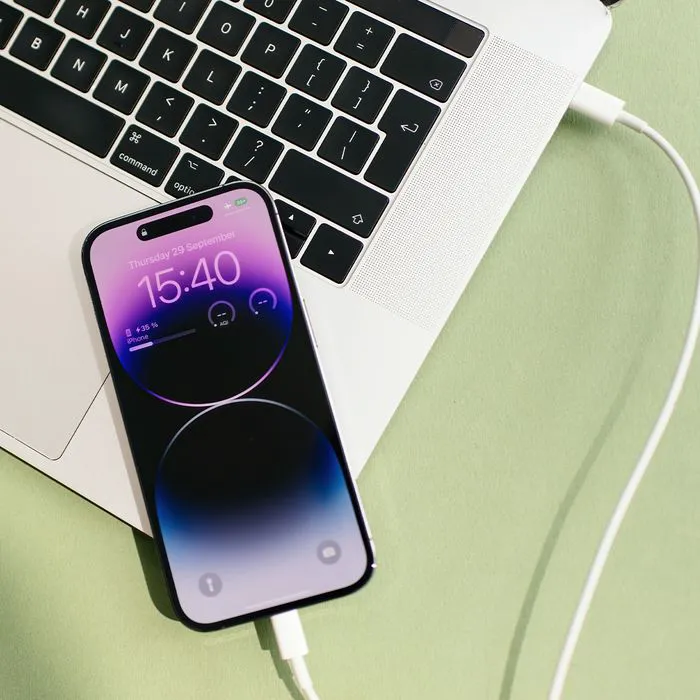
Featured image

If your phone is so slow it takes a dog’s age to get it to download an app or load web pages, it may be time to take control of the situation. You don’t necessarily have to buy a new battery to make a big difference. You could be unknowingly committing a few iPhone mistakes that are slowing your iPhone down and making your user experience a lot less pleasurable. Here are three mistakes you should never make if you want a faster iPhone, according to tech experts. 

Enabling the low-power mode too often 

It’s actually a common mistake to frequently enable the low-power mode from Settings to get longer battery life, according to John Willis, the founder of Convertfree. “Unknowingly, this can slow down your phone,” Willis said. “Apple highly promotes the low power mode feature for people who are too busy to deal with a low battery between work. But this feature limits some apps’ actions and makes your iPhone sluggish. You miss out on using the quick, instant features that the iPhone provides by routinely turning on low power mode in an effort to conserve phone battery. Your iPhone will run significantly faster if you disable the low-power mode unless it is absolutely necessary.”

Not regularly clearing out your cache

One of the biggest mistakes you can make if you want a faster iPhone is not regularly clearing out your cache, says Jeroen van Gils, the CEO of LiFi. “Over time, your cache can become full of junk data that can slow down your phone’s performance,” van Gils. “To clear your cache, simply go to Settings > Safari > Clear Cache.”

Keeping too many apps running in the background

“If you have a lot of apps running in the background, it can really slow down your iPhone’s performance,” van Gils said. “To close out apps that are running in the background, simply double-click the Home button and then swipe up on the app preview screens.”

And one more important tip to keep in mind: if your phone isn’t updated to the latest iOS version it isn’t going to run as fast or well. “One of the best ways to keep your iPhone running fast is to make sure you’re always using the latest version of iOS,” van Gils said. “Apple releases new iOS updates regularly that contain performance improvements and bug fixes. To update to the latest iOS version, go to Settings > General > Software Update.” 

Author:

Lisa Fogarty is a lifestyle writer and reporter based in New York who covers health, wellness, relationships, sex, beauty, and parenting.

Gisele Bündchen at the Met Gala
Ozzy and Sharon Osbourne posing together
Hairdresser giving a trendy haircut to a client
Princess Beatrice with Princess Eugenie and King Charles at an event
Bianca Censori at the 67th Annual Grammy Awards, showcasing fashion
Christina Aguilera celebrating The Abbey's 35th Anniversary Party
King Charles with Prince William and Sarah Ferguson at a gathering
Beauty tools for an at-home spa experience
Donald Trump during a news conference at Mar-a-Lago Club
Ariana Grande and Ethan Slater sharing a moment together
Nicole Kidman attending the 4th Annual Academy Museum Gala
Bill Gates with Melinda Gates at a public appearance
Vitamins and supplements displayed on a shelf
Delicious cooked salmon with rice and greens
Jaden Smith at the premiere of Focus Features' Nosferatu
Person holding smartphone displaying various apps
Woman applying sunscreen for skin protection and beauty.
Angelina Jolie at a photocall for her latest project
Inside a Costco store showcasing products
Jennifer Garner supporting Baby2Baby charity event
Gisele Bündchen at the Met Gala
Ozzy and Sharon Osbourne posing together
Hairdresser giving a trendy haircut to a client
Princess Beatrice with Princess Eugenie and King Charles at an event
Bianca Censori at the 67th Annual Grammy Awards, showcasing fashion
Christina Aguilera celebrating The Abbey's 35th Anniversary Party
King Charles with Prince William and Sarah Ferguson at a gathering
Beauty tools for an at-home spa experience

Beauty

You know the saying, "An artist is only as good ...

Donald Trump during a news conference at Mar-a-Lago Club
Ariana Grande and Ethan Slater sharing a moment together
Nicole Kidman attending the 4th Annual Academy Museum Gala
Bill Gates with Melinda Gates at a public appearance
Vitamins and supplements displayed on a shelf
Delicious cooked salmon with rice and greens
Jaden Smith at the premiere of Focus Features' Nosferatu
Person holding smartphone displaying various apps
Woman applying sunscreen for skin protection and beauty.
Angelina Jolie at a photocall for her latest project
Inside a Costco store showcasing products
Jennifer Garner supporting Baby2Baby charity event