




Madonna at the Met Gala in stunning fashion.
Taylor Swift boarding a private jet in 2024.
Woman experiencing fatigue from lack of sleep.

Tech

The One Music App You Should Delete RIGHT NOW Because It Drains Your Battery

December 30, 2019 by Lisa Cupido
shefinds | Tech
Featured image

Our smartphones are our number one choice for discovering new music apps and conveniently playing tracks while we go for a run, work at our desks, commute — basically, any time is a good time for streaming music.

But playing music on our phones is one of the most significant ways you drain battery power — faster than you probably think. And this is the one music app you should delete RIGHT NOW because it drains your battery.

house unit img
Women Are Swapping Their Boring Water For This Ice Pop Electrolyte Mix!
iphone

Spotify


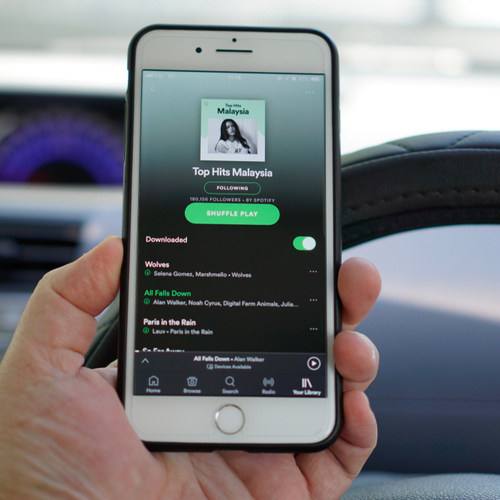
There are a number of music apps out there, with apps like Spotify dominating as one of the most popular options.


Spotify has been hooking us up with amazing music for more than 10 years. Many of us couldn’t dream of living without the app, which allows you to search for new music and create playlists that you can access wherever you roam.


Unfortunately, Spotify is one of the most draining of these music apps.
iphone

According to one study, it was discovered that out of three popular music apps, Spotify drained the battery on a Nexus 6 phone completely in just 24.9 hours — meanwhile, the Pandora app took 42.7 hours to drain the same phone’s battery, and Google Play Music drained it in 52.9 hours:


“In other words, for a music fan who spends a lot of time playing music on her smartphone, switching from Spotify to Google Play Music can extend the battery life and hence listening time by 2X!”
iphone

Many iPhone and Android users have posted complaints over the years about the excessive battery drainage they experience while using Spotify. Making the switch to Apple Music seems to help many out a great deal — this app is far better for your battery.

iphone

If you love Spotify and hate the thought of deleting the app, there are ways to improve its battery drainage issue. Find tracks, download them, and then listen to them offline to conserve battery power. To do this, go to Home > Settings > Playback > toggle Offline so that it’s on.


Author:

Lisa Fogarty is a lifestyle writer and reporter based in New York who covers health, wellness, relationships, sex, beauty, and parenting.

Latest iPhone 17 model showcasing sleek design.
Woman working on laptop in a casual setting.
Smartphone plugged into charger for power.
Display of various apps on iPhone screen.
Close-up of hands holding iPhone 17 Pro Max.
User interacting with iPhone in everyday use.
Person holding iPhone with multiple apps displayed.
Woman texting on smartphone with focused expression.
Android phone featuring a variety of applications.
Samsung Galaxy Z Flip 7 smartphone on display.
Woman enjoying fresh watermelon salad in casual outfit.
User holding Android phone displaying various apps.
iPhone 14 showcasing multiple applications on screen.
iPhone settings screen indicating low battery charge.
Sony headphones with iPad and laptop on Amazon.
Person using iPhone with apps visible on screen.
iPhone displaying a selection of apps available.
iPhone storage full notification on the screen.
User holding an iPhone with visible apps.
iPhone screen filled with various application icons.
Latest iPhone 17 model showcasing sleek design.
Woman working on laptop in a casual setting.
Smartphone plugged into charger for power.
Display of various apps on iPhone screen.
Close-up of hands holding iPhone 17 Pro Max.
User interacting with iPhone in everyday use.
Person holding iPhone with multiple apps displayed.
Woman texting on smartphone with focused expression.
Android phone featuring a variety of applications.
Samsung Galaxy Z Flip 7 smartphone on display.
Woman enjoying fresh watermelon salad in casual outfit.
User holding Android phone displaying various apps.
iPhone 14 showcasing multiple applications on screen.
iPhone settings screen indicating low battery charge.
Sony headphones with iPad and laptop on Amazon.
Person using iPhone with apps visible on screen.
iPhone displaying a selection of apps available.
iPhone storage full notification on the screen.
User holding an iPhone with visible apps.
iPhone screen filled with various application icons.

















